Envelope
Canonical ApprovalEnvelope and Decision types.
Every plugin maps in and out of one shape owned by @hitly/core.
type PluginId = 'mastra' | 'http' | 'langgraph' | 'temporal' | 'hermes'
type Decision = 'accept' | 'reject' | 'edit' | 'respond' | 'ignore' | 'cancel'

interface ApprovalEnvelope {
  action: { name: string; args: Record<string, unknown> }
  allowedActions: Record<Decision, boolean>
  contextMarkdown?: string
  metadata?: Record<string, unknown>
  externalUrls?: { url: string; label?: string }[]
  attachments?: { name: string; url?: string; contentType?: string }[]
  resumeSchema?: Record<string, unknown>
  expiresAt?: string

  // Typed editable fields (allowlist + validation)
  editableFields?: Record<string, {
    type: 'string' | 'int' | 'float' | 'bool' | 'enum' | 'array'
    label?: string
    minLength?: number
    maxLength?: number
    min?: number
    max?: number
    step?: number
    options?: Array<string | { value: string; text: string }>
    items?: 'string' | 'int' | 'float'
    minItems?: number
    maxItems?: number
  }>

  // Edit reason capture (not part of action.args)
  editReason?: {
    dropdown?: false | { required?: boolean; options?: Array<string | { value: string; text: string }>; label?: string }
    text?: false | { required?: boolean; maxLength?: number; label?: string }
  }

  // Evidence fields (optional, persisted when present)
  traceId?: string
  spanId?: string
  agentId?: string
  systemId?: string
  inventoryId?: string
  policyId?: string
  policyRationale?: string
  riskTier?: string
  toolName?: string
  sensitivity?: string[]
  dataCategories?: string[]
}

interface OriginRef {
  plugin: PluginId
  projectId: string
  runId: string
  stepId?: string
  resumeHandle: Record<string, unknown>

  // Evidence fields from origin (optional, persisted when present)
  traceId?: string
  spanId?: string
  agentId?: string
  systemId?: string
  inventoryId?: string
  policyId?: string
  policyRationale?: string
  riskTier?: string
  toolName?: string
}
resumeHandle is opaque per plugin (Mastra base URL + run/step ids, Hermes request/task ids, HTTP resumeUrl + optional metadata, LangGraph thread id, Temporal workflow id). Origin credentials live on the project.
HTTP ingest may include metadata (a JSON object). It is stored on the envelope and echoed unchanged on the resume POST for both accept and reject, next to decision and the HITLy id.
Typed Editable Fields
When allowedActions.edit is true, the origin can declare which fields the reviewer may edit and how they are validated. editableFields is a dictionary where each key is an action.args field name and the value defines its type and constraints.
Keys not listed in editableFields are locked and cannot be edited, even if the client sends them. If allowedActions.edit is true but editableFields is missing or empty, HITLy fail-closes: the Edit button is hidden in the UI, and any edit decision returns HTTP 400.
Field Types
string: Text input. SupportsminLength,maxLength,label.int: Integer input. Supportsmin,max,label.float: Decimal input. Supportsmin,max,step,label.bool: Checkbox. Supportslabel.enum: Dropdown picker. Requiresoptions(array of strings or{ value, text }objects). Emptyoptions→ 400.array: Add/remove list of items. Requiresitems('string' | 'int' | 'float'). SupportsminItems,maxItems,label.
Example: Refund with Editable Amount
{
  action: { name: 'send_refund', args: { orderId: 'OR-123', amount: 100 } },
  allowedActions: { accept: true, reject: true, edit: true },
  editableFields: {
    amount: { type: 'int', min: 1, max: 500, label: 'Refund amount' }
  }
}
The reviewer sees a form with a single amount field (number input with min/max). orderId is locked and shown read-only in the args block.
If the reviewer edits amount to 50, the decide POST must include:
{
  "decision": "edit",
  "editedArgs": { "amount": 50 },
  "final_sha256": "<sha256 of merged args>"
}HITLy merges locked fields (orderId) with the edited fields (amount) and validates:
- Extra keys (e.g.,
orderIdineditedArgswhen onlyamountis editable) → HTTP 400 - Type mismatch (string in
int, NaN, array of objects) → HTTP 400 - Out-of-range or invalid values → HTTP 400
The origin receives the merged args ({ orderId: 'OR-123', amount: 50 }). The evidence decided event stores only the allowlisted delta in editedArgs, and final_sha256 is the hash of the merged args.
Enum Options
enum options support both shorthand strings and labeled objects:
editableFields: {
  refundType: {
    type: 'enum',
    options: ['full', 'partial'],  // value = label
    label: 'Refund type'
  },
  reason: {
    type: 'enum',
    options: [
      { value: 'damaged', text: 'Item damaged' },
      { value: 'late', text: 'Delivery late' }
    ],
    label: 'Reason'
  }
}
The UI picker shows text (or the string itself). The editedArgs POST always contains the value.
Edit Reason
When allowedActions.edit is true, the origin can optionally capture why the reviewer edited the action. Edit reason is not part of action.args and is stored separately in the decision payload and evidence.
Configuration
editReason?: {
  dropdown?: false | { required?: boolean; options?: Array<string | { value: string; text: string }>; label?: string }
  text?: false | { required?: boolean; maxLength?: number; label?: string }
}- Omit
editReason: Both dropdown and text are shown, optional, with default dropdown options. - Dropdown: Set to
falseto hide, or configure withrequired, customoptions, andlabel. Default options:customer_request,pricing_correction,policy_exception,other. - Text: Set to
falseto hide, or configure withrequired,maxLength(default 2000), andlabel.
Example
{
  action: { name: 'send_refund', args: { orderId: 'OR-123', amount: 100 } },
  allowedActions: { accept: true, reject: true, edit: true },
  editableFields: {
    amount: { type: 'int', min: 1, label: 'Amount' }
  },
  editReason: {
    dropdown: { required: true, options: ['customer_escalation', 'manager_override', 'other'] },
    text: { maxLength: 500, label: 'Additional details' }
  }
}
The reviewer must select a dropdown reason and may optionally provide text. The decide POST includes:
{
  "decision": "edit",
  "editedArgs": { "amount": 50 },
  "editReason": "customer_escalation",
  "editReasonText": "Customer threatened chargeback",
  "final_sha256": "<sha256 of merged args>"
}
Validation rules:
- Required dropdown or text field left blank → HTTP 400
- Dropdown value not in
options→ HTTP 400 - Text exceeds
maxLength→ HTTP 400
Edit reason is persisted in the DecisionPayload and the evidence decided event under oversight.edit_reason and oversight.edit_reason_text. It is not merged into action.args or included in final_sha256.
Evidence Fields
Evidence fields provide audit context for compliance and governance. All are optional at ingest; HITLy persists them when present.
| Field | Source | Description |
|---|---|---|
traceId | OTel/Mastra context | Distributed trace ID |
spanId | OTel/Mastra context | Current span ID |
agentId | Mastra/implementor | Agent/workflow identifier (Mastra fills for agents) |
systemId | Implementor | AI system identifier being governed (e.g. "refund-agent-prod", "order-workflow") |
inventoryId | Implementor | This AI system's record in your AI inventory/registry (Layer 1), not a business object ID |
policyId | Implementor | Policy or rule that triggered this approval |
policyRationale | Implementor | Why this action requires approval |
riskTier | Implementor | Risk classification (e.g. "high", "medium", "low") |
toolName | Implementor/Mastra | Tool or action name in the origin framework |
sensitivity | Implementor | Sensitivity flags (not raw PII) |
dataCategories | Implementor | Data category flags for GDPR/compliance |
HITLy is deployer tooling, not the high-risk system. systemId is the AI system you are governing (e.g. your agent or workflow deployment). inventoryId is that system's entry in your AI inventory/registry, not a business resource like an order ID or user ID.
What Mastra Fills Automatically
The Mastra plugin automatically captures:
traceId,spanId(from OTel context, if present)agentId(for agent approvals)runId,stepId,toolCallId(always)
Everything else must be passed by the implementor via notifyHitlyApproval() config.
Example: Mastra with Evidence
import { notifyHitlyApproval } from '@hitly/plugin-mastra'

await notifyHitlyApproval(
  {
    apiUrl: process.env.HITLY_API_URL!,
    apiKey: process.env.HITLY_API_KEY!,
    projectId: process.env.HITLY_PROJECT_ID!,
    mastraBaseUrl: process.env.MASTRA_BASE_URL!,
    agentId: 'refund-agent',
    action: { name: 'send_refund', args: { orderId, amount } },

    // Evidence fields the implementor must provide
    systemId: 'refund-agent-prod',
    inventoryId: 'ai-inv-refund-agent-v2',  // Your AI inventory record, not orderId
    policyId: 'refund-over-100',
    policyRationale: 'Refunds over $100 require manager approval',
    riskTier: 'medium',
    toolName: 'send_refund',
  },
  { runId: String(runId), suspendPayload: { reason: 'Approval required' } },
)
Evidence events are written to the configured HTTP sink (see Evidence Storage below) as hitly.evidence.v1 JSON.
External URLs (Decision Context)
The externalUrls field provides reviewers with by-reference links to external decision context: order pages, support tickets, policies, customer profiles, and other resources that should inform the decision. HITLy displays these links in the work item detail but does not fetch or proxy the remote content.
Format
externalUrls accepts either a simple string array (legacy) or an array of objects with optional labels:
// Simple URLs (backward compatible)
externalUrls: [
  'https://example.com/orders/OR-123',
  'https://example.com/tickets/TK-456'
]

// With labels (recommended)
externalUrls: [
  { url: 'https://example.com/orders/OR-123', label: 'Order #123' },
  { url: 'https://example.com/tickets/TK-456', label: 'Support Ticket' },
  { url: 'https://example.com/policies/refund-policy' }  // label is optional
]
Reviewers see labeled links in the work item detail. Clicking a link opens it in a new tab (target="_blank" rel="noopener noreferrer").
Evidence
Evidence events hash the URL list and labels (by-reference metadata only), not the remote page bytes. The decided event includes the same externalUrls array that was present at ingest. HITLy does not fetch, store, or verify the remote content—it is the integrator's responsibility to ensure links remain accessible for the evidence retention period.
Example: Mastra with External URLs
import { notifyHitlyApproval } from '@hitly/plugin-mastra'

await notifyHitlyApproval(
  {
    // ... config fields omitted for brevity
    action: { name: 'send_refund', args: { orderId, amount } },
  },
  {
    runId: String(runId),
    suspendPayload: {
      reason: `Refund of ${amount} for ${orderId}`,
      externalUrls: [
        { url: `https://shop.example.com/orders/${orderId}`, label: `Order ${orderId}` },
        { url: 'https://shop.example.com/policies/refund', label: 'Refund Policy' },
        `https://zendesk.example.com/tickets/${ticketId}`  // plain string also works
      ],
    },
  },
)
Out of Scope
HITLy does not support:
- File attachments (declared via
attachments, but fetch/upload is not implemented) - Proxying or virus-scanning remote URLs
- SSO or authentication to remote pages
- Assigning work items based on external URL patterns
Evidence Storage
Configure an evidence sink in project settings. HITLy supports three sink types:
Sink Types
- None (default): No evidence storage. HITLy keeps a minimal receipt in the database.
- HTTP: POST evidence events to an HTTP endpoint (e.g., your audit log service, SIEM collector).
- S3: Store evidence events in S3-compatible object storage (AWS S3, Cloudflare R2, Garage, on-premises Ceph/Cloudian).
HTTP Sink Configuration
- Sink URL: POST destination for evidence events
- Authorization Header: Optional auth token
- Custom Headers: Optional HTTP headers (one per line:
Name: value) - Metadata: Optional JSON object sent as transport-only metadata
Evidence events are POSTed to your URL with:
Content-Type: application/jsonIdempotency-Key: <event_id>Authorizationheader (if configured)- Custom HTTP headers (if configured)
X-Hitly-Metadataheader with JSON-encoded metadata (if configured)- Full event JSON body (see
packages/core/src/evidence.ts)
Important: Custom headers and metadata are transport-only. They are sent with the HTTP request but are not stored in the evidence event body. This preserves the content_sha256 hash. Use them to pass routing information, credentials, or context to your storage backend without affecting the canonical evidence record.
See examples/evidence-http for a reference HTTP receiver.
S3 Sink Configuration
See S3 evidence for S3 configuration fields, local setup with Garage, production settings (AWS S3, Cloudflare R2, on-premises Ceph/Cloudian), and examples/evidence-s3.
HITLy stores a receipt index only, not the payload as system of record. Evidence lifecycle:
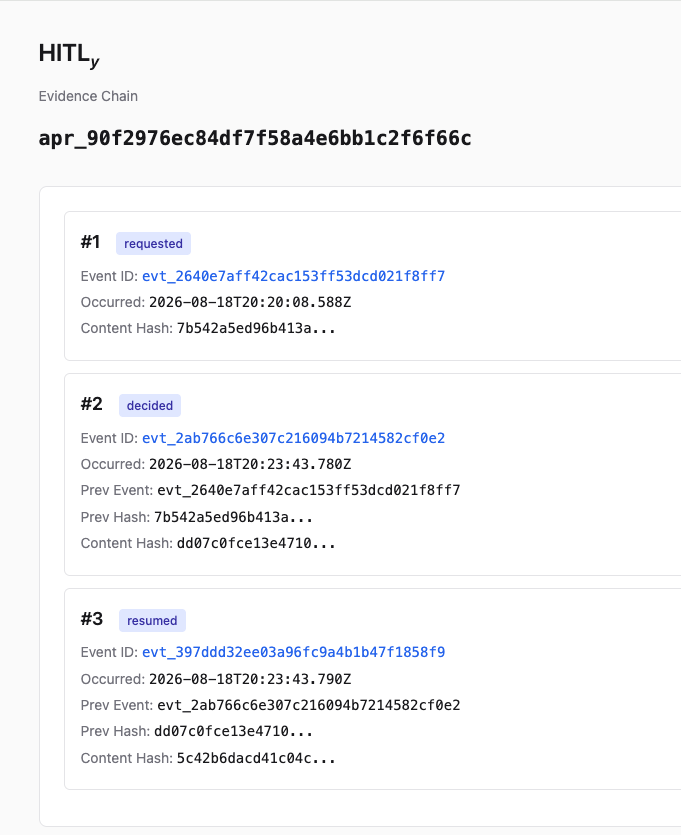
requested- Approval ingested (fail-open: continues on sink error)presented- Ask first shown to a reviewer who can decide (fail-open). Host-sourced, nodata; setsactivity.presentedAt(hitl-spec 4.3/5.2). Emitted at most once per approval; a decision without a priorpresentedrecords one immediately beforedecidedso the chain order is preserved.decided- Reviewer decided (fail-closed: origin NOT resumed if sink fails)resumed/resume_failed- Origin resume outcome (fail-open)
decided events carry oversight.decidedBy ({kind, id, display?}, hitl-spec 4.1: kind: "human" with a stable per-person id) and, when the reviewer's client was recognised, oversight.client ({channel: "web" | "mobile" | "api", platform?, appVersion?, userAgent?}). presented events carry the same information as presented.actor and presented.client. Device/channel details live only in hitly.evidence.v1 (hitl-spec 5.3 permits them only where an evidence format defines them): no IP address is recorded, there is no read tracking, and presented means opened, never read.
Each event includes integrity fields (prev_event_id, prev_content_sha256, content_sha256) for tamper detection.
Finding a Receipt
After a decision, the work item displays a View evidence receipt link (for http(s) store_uri only). This opens the evidence event in the external store.
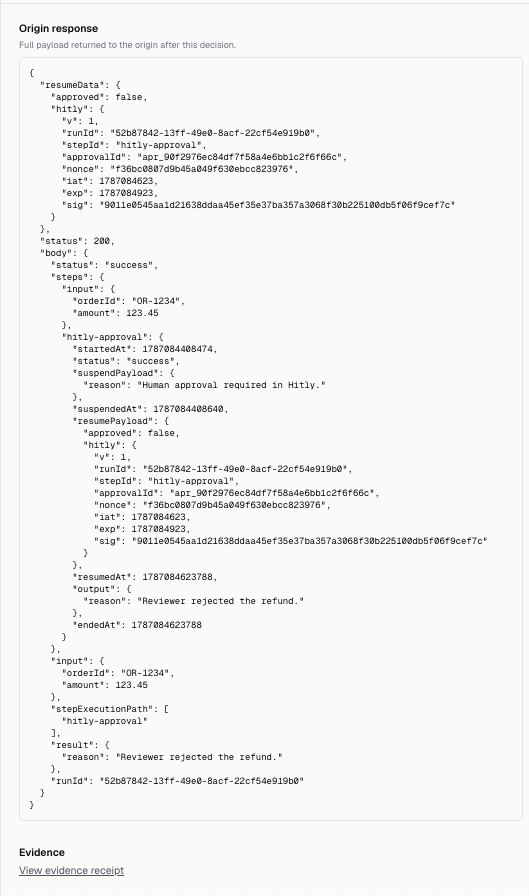
The external store's approval page (/a/:approval_id) displays the full event chain for that approval. In the example below, approval apr_90f2976ec84df7f58a4e6bb1c2f6f66c links three events: requested, decided, and resumed.
See examples/evidence-http for a reference receiver that writes events to disk.