n8n
Pause on a Wait webhook, review in HITLy, POST the resume URL.
The HTTP adapter is available today — create an HTTP project and hand-roll a Wait node.
n8n pauses with a Wait node. Resume happens only via $execution.resumeUrl (or form URL).
How it works with HITLy
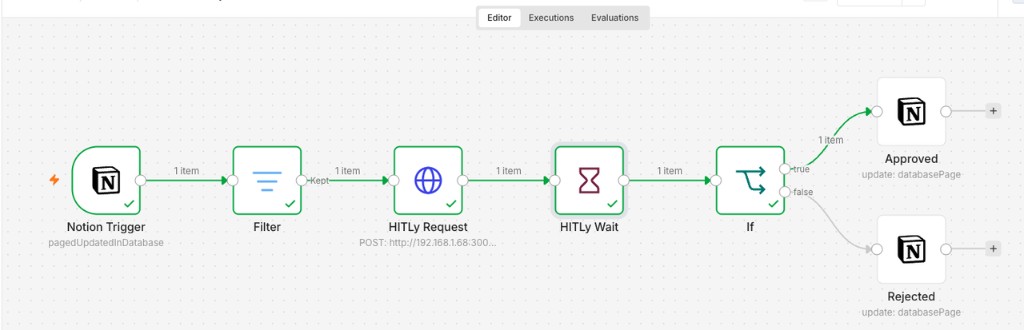
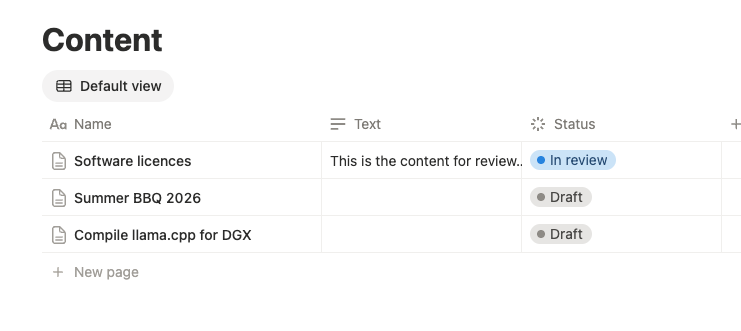
- Notion Trigger (or HTTP Request) POSTs context +
$execution.resumeUrlto HITLy ingest withplugin: "http". - Wait node On Webhook Call on the same chain (not a second Webhook trigger).
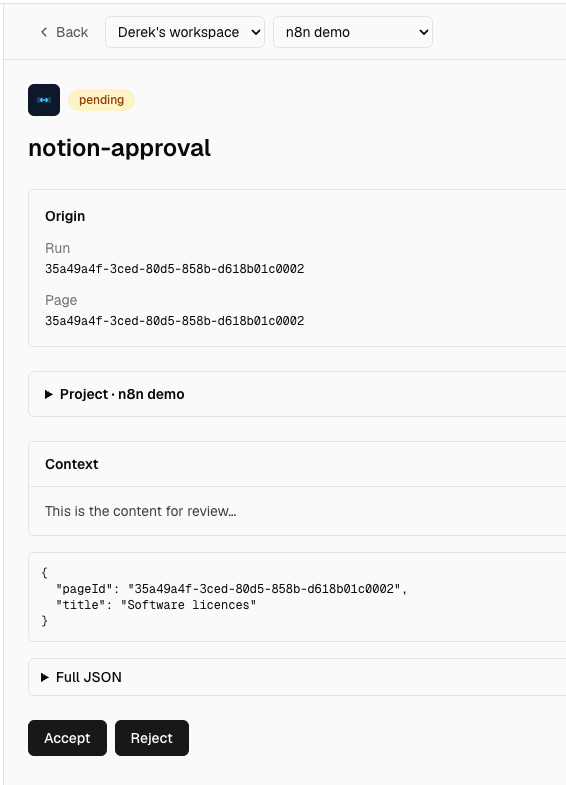
- Reviewer decides in HITLy.
- HITLy POSTs
{ decision, id, metadata }to$execution.resumeUrland the Wait node continues.
A disconnected Webhook node on the same canvas is a separate workflow. Its /webhook-test/... URL 404s unless you click Listen; production /webhook/... only works when that Webhook is the trigger of an active workflow.
Setup (hand-roll today)
Create a HITLy project with plugin HTTP. Point an HTTP Request node at POST /api/v1/approvals with a project API key, plugin: "http", projectId, resumeUrl ($execution.resumeUrl), and any metadata you need echoed on decide.
Set WEBHOOK_URL on self-hosted n8n so resume URLs are not localhost.
Step-by-step recipe: examples/n8n. Notion Status mapping: examples/notion.
Decision mapping
| HITLy | n8n |
|---|---|
accept | POST { "decision": "accept", "id", "metadata" } |
reject | POST { "decision": "reject", "id", "metadata" } (branch in the workflow) |
Related
- HTTP adapter
- Envelope
- API
- Recipe:
examples/notion